Austin Home Austin Home

7 Best Benefits of Ergonomic Home Office Furniture

Time:2026-09-28 Author:Liam
0%

A home office can look polished and still leave your shoulders tense by lunchtime. A chair that is too high, a screen set too low, or a desk crowded with cables can quietly shape the way you work. That is why people ask, “why is ergonomics important in home office furniture?” It is not just about comfort. It is about making everyday work fit the person doing it.

The World Health Organization reports that about 1.71 billion people worldwide live with musculoskeletal conditions. This figure does not mean home office furniture prevents or treats these conditions. It does show why posture, movement, and sustained comfort deserve attention. Cornell University ergonomics expert Dr. Alan Hedge describes the principle this way: “Ergonomics is the science of fitting the job to the worker, rather than forcing the worker to fit the job.” A well-adjusted chair, a desk at a workable height, and a monitor near eye level can help make that principle practical.

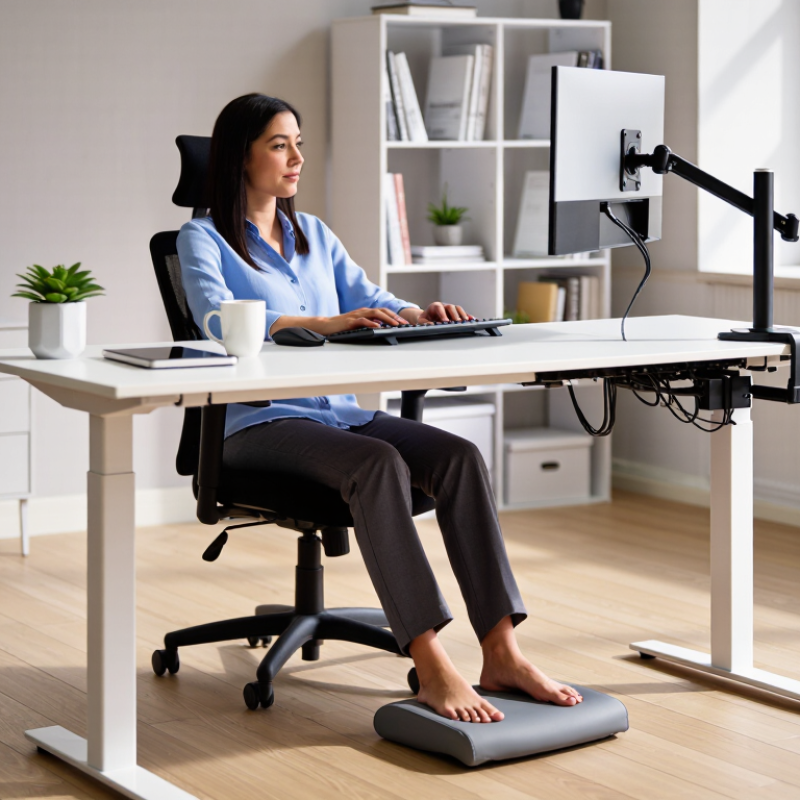
Small changes matter. A footrest can support dangling feet; an adjustable chair can bring the keyboard within easy reach. Still, no single chair fixes every workday. People move, setups vary, and even good furniture can be adjusted poorly. The benefits are real, but they depend on fit and habits. In this guide, we explore seven benefits of ergonomic home office furniture, from better daily comfort to a workspace that supports focused work. Often, the difference starts with one simple adjustment.
7 Best Benefits of Ergonomic Home Office Furniture

Core Features of Ergonomic Home Office Furniture

Ergonomic home-office furniture should fit the person and the task. Adjustability is the core feature. A chair should let you set seat height, support your lower back, and keep both feet steady on the floor or a footrest. A little movement helps, too. Fixed posture gets tiring. A desk should leave room for relaxed shoulders and forearms, while the monitor sits directly ahead, roughly an arm’s length away. OSHA’s Computer Workstations eTool recommends positioning the screen to reduce neck strain and keeping frequently used items within easy reach.

Good details are easy to overlook. A seat that is too deep can press behind the knees; a monitor placed off-center can invite hours of neck turning. Choose a keyboard and mouse that allow neutral wrists, and adjust lighting to limit screen glare. The UK Health and Safety Executive reported 543,000 workers with work-related musculoskeletal disorders in 2023/24, alongside 7.8 million lost working days. That figure signals a real workplace burden, but it does not prove furniture alone prevents pain. Fit varies, and even a well-adjusted chair cannot replace breaks. Sometimes the best adjustment is standing up.

How Ergonomic Furniture Supports Healthy Posture

How Ergonomic Furniture Supports Healthy Posture

Ergonomic furniture helps make a comfortable, neutral posture easier to maintain. An adjustable chair can support the lower back while allowing both feet to rest flat on the floor. If they do not reach, a footrest may help. The seat should leave a little space behind the knees, rather than pressing into them. Small details matter.

A desk and chair should work together. When the desk is too high, shoulders may creep upward; when it is too low, the back may round. Adjust the chair so elbows sit near desk height, with shoulders relaxed. Place the screen roughly at eye level and about an arm’s length away. This can reduce the urge to lean forward, though the ideal distance varies with screen size and vision.

Good setup is not perfect posture all day. Even well-fitted furniture cannot replace movement. Stand, stretch, or change position regularly. It can take a few days to notice which adjustments feel useful, and some may need rethinking. A cushion that seems supportive at first may push the body out of alignment. Pay attention to comfort, and adjust one feature at a time.

Benefits for Comfort, Pain Reduction, and Physical Well-Being

7 Best Benefits of Ergonomic Home Office Furniture

Benefits for Comfort, Pain Reduction, and Physical Well-Being

A supportive chair and a desk at the right height can make long work sessions feel less tiring. Your feet should rest flat, with knees near hip level. Keep the screen roughly an arm’s length away, with its top near eye level. Small adjustments matter. A keyboard positioned close to your body can help keep your shoulders relaxed, while a chair with adjustable support can make it easier to sit upright without straining. These changes may reduce everyday discomfort, though furniture alone cannot prevent or treat every cause of pain.

Tips: Adjust one thing at a time, then notice how your body feels after an hour. If your feet dangle, try a stable footrest. Keep your mouse close, and let your elbows rest comfortably near your sides. Stand or stretch between tasks when practical. There’s no perfect setup.

Ergonomic furniture can also encourage healthier movement by making position changes easier. A sit-stand desk, for example, offers another option when sitting begins to feel stiff. Still, standing all day is not automatically better; alternating positions is often more comfortable. Pay attention to recurring pain or numbness, and consider seeking guidance from a qualified health professional. Even a careful setup may need tweaking as your workload, body, or room changes.

Effects on Focus, Productivity, and Work Satisfaction

7 Best Benefits of Ergonomic Home Office Furniture
Effects on Focus, Productivity, and Work Satisfaction

Ergonomic home office furniture can make focused work feel less tiring. A chair with adjustable height and back support helps keep your feet grounded and your shoulders relaxed. A desk at a comfortable height can reduce the urge to hunch over a laptop. When your screen sits near eye level, you may spend less time shifting around to ease neck strain. These changes can support concentration, especially during long stretches of computer work. They are not a cure-all. Poor sleep or a noisy room can still disrupt focus.

Tips: Adjust your chair so your elbows rest near desk height. Place your screen about an arm’s length away, then raise it if you keep looking down. Take short standing or stretching breaks. Small adjustments help, but they may take a few tries.

Comfort can also influence productivity and work satisfaction. With fewer aches distracting you, it may be easier to finish a report or stay present in a video call. A workspace that fits your body can feel more inviting, too. Pay attention to how you feel at the end of the day: stiff shoulders or a sore lower back may signal that something needs adjusting. I used to think a better chair would fix every uncomfortable workday. That was too simple. Furniture matters, but movement, lighting, and realistic breaks matter as well.

Choosing Furniture for Long-Term Home Office Use

Choosing furniture for long-term home office use starts with your body, not a trend. A chair should support your lower back while letting your feet rest flat or on a stable footrest. Seat depth matters: leave a small gap between the seat edge and the backs of your knees. Test adjustments in ordinary work clothes, not just for a minute in a showroom. Comfort can change after lunch.

A desk should fit the tasks you actually do. If you type for hours, keep the keyboard near elbow height and place the screen roughly an arm’s length away. Adjustable desks can make standing easier, but standing all day is not the goal. Change positions regularly. Small changes matter. A footrest, monitor riser, or separate keyboard may solve a specific mismatch more cheaply than replacing every piece. Measure doorways, desk width, and cable reach before ordering; overlooked details can become daily annoyances.

Materials deserve equal attention. Look for sturdy joints, replaceable parts, smooth edges, and surfaces that clean without special products. A padded chair can feel inviting yet trap heat, so consider room temperature and fabric texture. I used to think a higher price meant a better fit; that is not always true. Sit, adjust, and notice pressure points. Your setup may need revision as work habits shift.

7 Best Benefits of Ergonomic Home Office Furniture – Choosing Furniture for Long-Term Home Office Use

Benefit Furniture or Setup Feature Practical Long-Term Value What to Look For
1. Better posture support An adjustable chair with seat-height and backrest adjustments Makes it easier to position the body comfortably during desk work; a well-fitted chair can support a neutral sitting posture. Feet can rest flat or on a footrest, thighs are supported, and the backrest fits the lower back.
2. More comfortable desk positioning A desk with a suitable height or adjustable work surface Helps place the keyboard and mouse within easy reach, reducing the need to hunch or raise the shoulders. When seated, the work surface allows relaxed shoulders and elbows close to the body.
3. Easier changes in working position A sit-stand desk or a stable alternative standing setup Allows users to alternate positions during the day. Changing posture can reduce time spent continuously sitting or standing in one position. The desk adjusts securely to both sitting and standing heights; movement is comfortable and gradual.
4. A more comfortable screen position A monitor stand or adjustable monitor arm Makes it easier to position the screen at a comfortable viewing height and distance, helping avoid prolonged neck bending. The screen is directly in front of the user, with its top at or slightly below eye level for many seated setups.
5. Better leg and foot support A footrest, where needed, paired with a properly adjusted chair Can provide a stable place for the feet when the chair height needed for desk work leaves them unsupported. The footrest supports the feet without forcing the knees or hips into an uncomfortable position.
6. Less visual discomfort from lighting and glare An adjustable task light and a screen position that avoids reflections Supports comfortable reading and close work by providing light where it is needed and helping manage screen glare. The light can be directed onto the work area without shining into the eyes or reflecting strongly on the screen.
7. A tidier, more accessible workspace Storage, cable management, and a layout that keeps frequently used items close Helps reduce desk clutter and unnecessary reaching, making the workspace easier to maintain over time. Everyday items are within comfortable reach, cables are secured, and storage does not obstruct legroom.

FAQS

How should I adjust my chair for comfortable sitting?

Set the seat so both feet rest flat. Keep your knees near hip level. Adjust the back support to fit your lower back.

Where should I place my monitor?

Put it directly in front of you, about an arm’s length away. Keep the top near eye level to reduce repeated neck bending.

What desk height works best?

Choose a height that lets your shoulders relax and forearms rest comfortably. Your elbows should sit near desk height.

Can ergonomic furniture prevent pain?

It may reduce everyday discomfort, but it cannot prevent or treat every cause of pain. Fit varies. Breaks still matter.

What if my feet do not reach the floor?

Use a stable footrest. Avoid letting your feet dangle for long periods.

Is standing all day better than sitting?

Not necessarily. A sit-stand desk gives you another option, but alternating positions is often more comfortable. Keep moving.

How can I reduce neck and wrist strain?

Keep the screen centered, and place your keyboard and mouse close. Aim for relaxed shoulders and neutral wrists.

Will better furniture improve my focus?

It can make long work sessions feel less tiring. But noise, poor sleep, and missed breaks can still disrupt concentration. A chair cannot fix everything.

Conclusion

Ergonomic home office furniture is designed to support the body during long periods of sitting and working. Key features may include adjustable chair height, lumbar support, a desk suited to the user’s needs, and a monitor positioned at a comfortable viewing level. These features encourage healthy posture by helping keep the back supported, shoulders relaxed, and wrists aligned. Understanding why is ergonomics important in home office furniture starts with its role in reducing strain and making everyday work more comfortable.

With a better-fitting setup, people may experience less discomfort and fatigue, supporting their physical well-being throughout the day. Comfort can also make it easier to focus, stay productive, and feel satisfied with work. When choosing furniture for long-term home office use, consider adjustability, durability, available space, and how each item fits your body and daily tasks. A thoughtful setup can support both immediate comfort and healthier work habits over time.

Liam

Liam

Liam is a dedicated marketing professional with a profound expertise in the industry, where he excels at highlighting the unique advantages of our core products. With a keen understanding of market trends and consumer needs, Liam frequently updates our company’s professional blog, providing......